I wanted to set up a newsletter because that’s apparently what you’re supposed to do when you have a blog.
I looked at the standard ways to handle this and they all felt like a lot of overhead for a small personal project. I wanted something that felt like it belonged here, without the extra baggage of a typical marketing platform or a complex setup.
The Problem
I wanted a simple flow. I write a blog post in Markdown, push to GitHub, let Cloudflare Pages build the site, and my subscribers get an email.
I already use Resend for other projects, and so I wanted to stick with that instead of adding another vendor to my stack. I didn’t want to hook up to more services, mess with new APIs, or deal with heavy SDKs just to bridge my content to my subscribers.
I know there are turnkey tools built for this kind of thing, and many of them are practically frictionless. But they are often paid or require you to duplicate your content into their own dashboards. Even then, there was still the issue of how to actually trigger an email campaign from a Git push. I looked at several solutions ranging from basic automation hooks to full on marketing platforms that do it all for you, but I thought…

The Stack
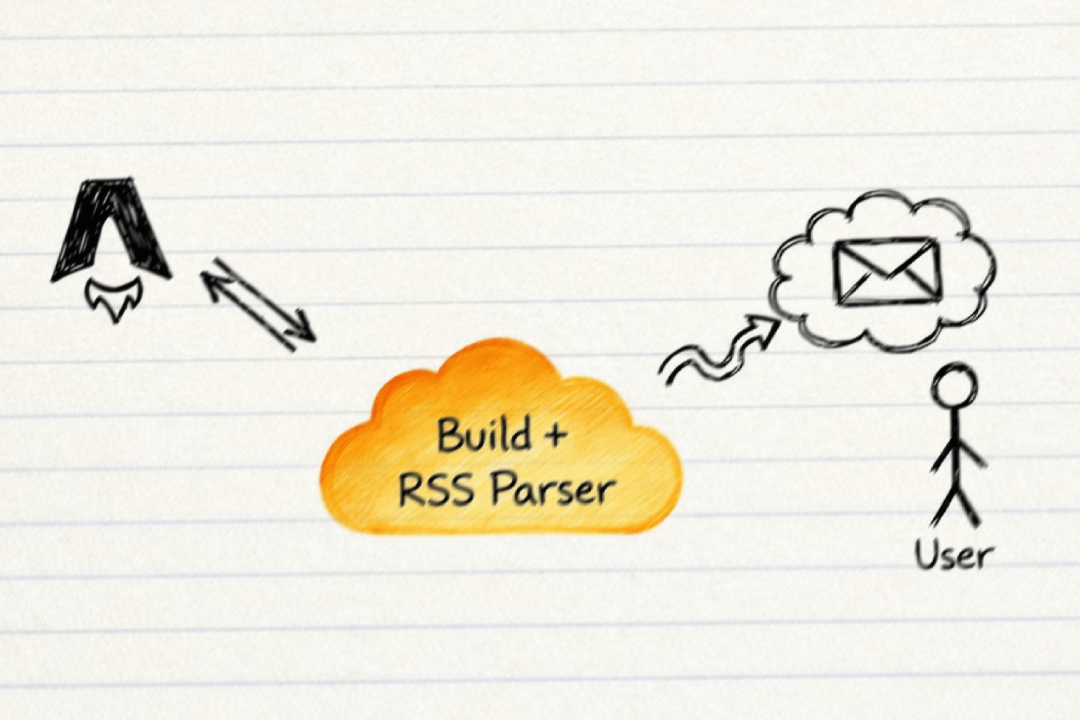
So I DIYed an automated email notification pipeline. Here are the moving parts:
- Astro: Generates the RSS feed (
rss.xml) from my existing content collections. - Resend: Actually sends the emails (their free tier is generous).
- RSS Parser: Reads my own feed.
- Cloudflare Pages: runs a simple script and then builds the site.
The Logic
Instead of hooking into a database or a complex CMS or mailing platform, I realized my production RSS feed is basically the “single source of truth” for what is currently live.
I wrote a script that runs before the build completes. It grabs the live RSS feed (what’s currently on the site) and compares it to the local file system (what I’m about to deploy).
If "Local Post" exists AND "Local Post" is NOT in "Live RSS" => Send Email.It’s stupid simple. It just listens to the “diff” between deployments.
The Script
I added a build:prod command to my package.json:
"build:prod": "tsx scripts/send-newsletter.ts && astro build"The script (send-newsletter.ts) does the heavy lifting:
- Fetches
https://sun-envidiado.com/rss.xml. - Scans
src/content/blog(where my content lives). - Checks for new slugs.
- Fires off an email via Resend to a specific contact segment.
It’s essentially a CI/CD pipeline step that acts as my marketing team!
The “Gotchas”
Of course, it wasn’t seamless.
- Double Builds: If I run this locally without checks, I casually spam everyone with “Hello World” test posts. So I added a check to only send emails if in production.
- Timing: The email sends before the build finishes. Technically, for a few minutes, the link in the email 404s until Cloudflare swaps the deployment. I call this “building anticipation” (Update: I fixed this by scheduling the email to send 30 minutes later, so the blog is definitely live by then).
- Edits: If I fix a typo in an old post, I have to make sure the script doesn’t think it’s “new.” The RSS comparison handles this nicely; it only cares about slugs, not content timestamps.
Conclusion
Is this over-engineered? Probably. Is there a better way to do this? Most likely. Is it satisfying? Absolutely.
It works for me, costs me nothing, and gives me an excuse to write more TypeScript. If you’re reading this after clicking the link in the email, it worked!
If you’re reading this on the site, maybe subscribe below and test my code for me? 🥹🙏🏼
Edit: June 2026
A few months later and I came back to fix something that was quietly bugging me.
The script was diffing against my live rss.xml. Which works fine. But that feed rebuilds every single post from scratch on every deploy, just so the newsletter can glance at a list of slugs. That is a lot of rendering to answer one tiny question: what is already live? And it only gets slower the more I write.
So I split that job out. Now there is a simple endpoint at /api/blog-slugs.json that returns nothing but the slugs. The newsletter reads that instead of the whole feed. The RSS feed stays exactly as it was, so anyone subscribed in their reader notices nothing.
While I was in there I also made it fail safe. If the script can’t reach the endpoint for whatever reason, it now sends nothing instead of assuming every post is new and blasting my whole list with a fresh copy of everything I have ever written. Past me did not have that guardrail. I would rather not find out the hard way.
Same stupid simple idea. Just less work per deploy, and a lot less room to embarrass myself.